The Homomorphic Processing Unit (HPU) is a hardware accelerator designed by Zama to perform computations directly on encrypted data. It provides an accessible user interface, while relying on tfhe-rs as the cryptographic reference software with TFHE (Fully Homomorphic Encryption over Torus) scheme. (If you’d like a gentle mathematical introduction to TFHE, we recommend this excellent deep dive post)
In this article, we’ll explain how the HPU executes an operation. The goal is to give curious developers a clear mental model for using the HPU—and, for the brave, to dive into its RTL code.
Of course, hardware never works alone. The HPU project also includes a software stack:
These components run on the host CPU, which manages the interaction with the HPU. In this post, we’ll focus on the hardware side, and only briefly mention the software where relevant. If you’re interested in the software implementation details, refer to GitHub.
Before diving into the hardware details, let’s clarify what the HPU actually is and how it works.
The HPU is a PCIe companion chip that operates alongside a host CPU (simply called “the host” here). The roles are clearly split:
To make this interaction possible, a dedicated protocol manages communication between the host and the HPU.
Integer representation
The HPU follows the same radix representation as tfhe-rs. Why? Because encrypting full integers directly in FHE/TFHE would make ciphertexts huge—growing exponentially with integer size—and computations would quickly become impractical.
Instead, integers are split into digits, and each digit is encrypted separately. These smaller digit ciphertexts are also called elementary ciphertexts.
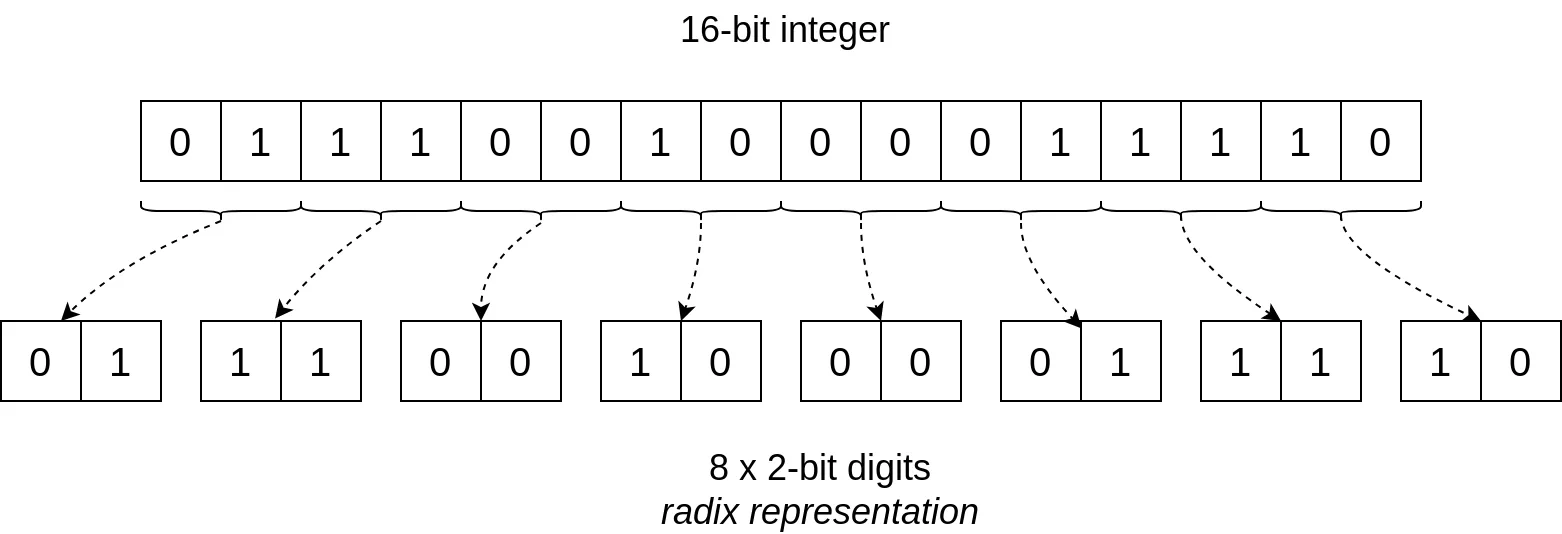
Encrypting each digit ciphertext is much smaller than encrypting the entire integer directly. Even the full set of digit ciphertexts is still smaller than a single “whole integer” ciphertext. The trade-off is that computations involve more elementary steps, but this cost is far outweighed by the efficiency gained from reduced ciphertext size.
Elementary ciphertexts
Think of an elementary ciphertext as a word of b bits. In practice, tfhe-rs uses ciphertexts encoding 4 bits plus d 1 padding bit (this latter is needed for the negacyclic property of polynomials—see the TFHE-rs handbook for details).
In the current HPU version:
The HPU is a programmable processing unit, meaning it runs programs provided by the user. Since the computations in the HPU operate on elementary ciphertexts at the digit level, the instructions are naturally expressed as digit operations (DOp).
Writing DOp directly can be tricky, especially for users who think in the perspective of full integers. To simplify this, the HPU can automatically translate integer operations (IOp) into the corresponding DOp code. In practice:
To make this easier, the HPU backend includes tools for writing and testing these codes.
At first glance, the HPU looks like a simple CPU: it loads instructions, processes data, and produces results. The difference lies in what it computes on: instead of plain 16-, 32-, or 64-bit integers, the HPU works on FHE ciphertexts.
Ciphertexts, however, bring an additional challenge: noise.
This is where Bootstrapping (BS) comes in.
Another crucial step is Key Switching (KS), which reformats ciphertexts so they can be processed correctly by PBS.
The HPU implements both KS and PBS directly in hardware. This makes it possible to perform an unlimited number of computations on TFHE ciphertexts. In fact, one of the available DOp instructions is precisely KS + PBS.
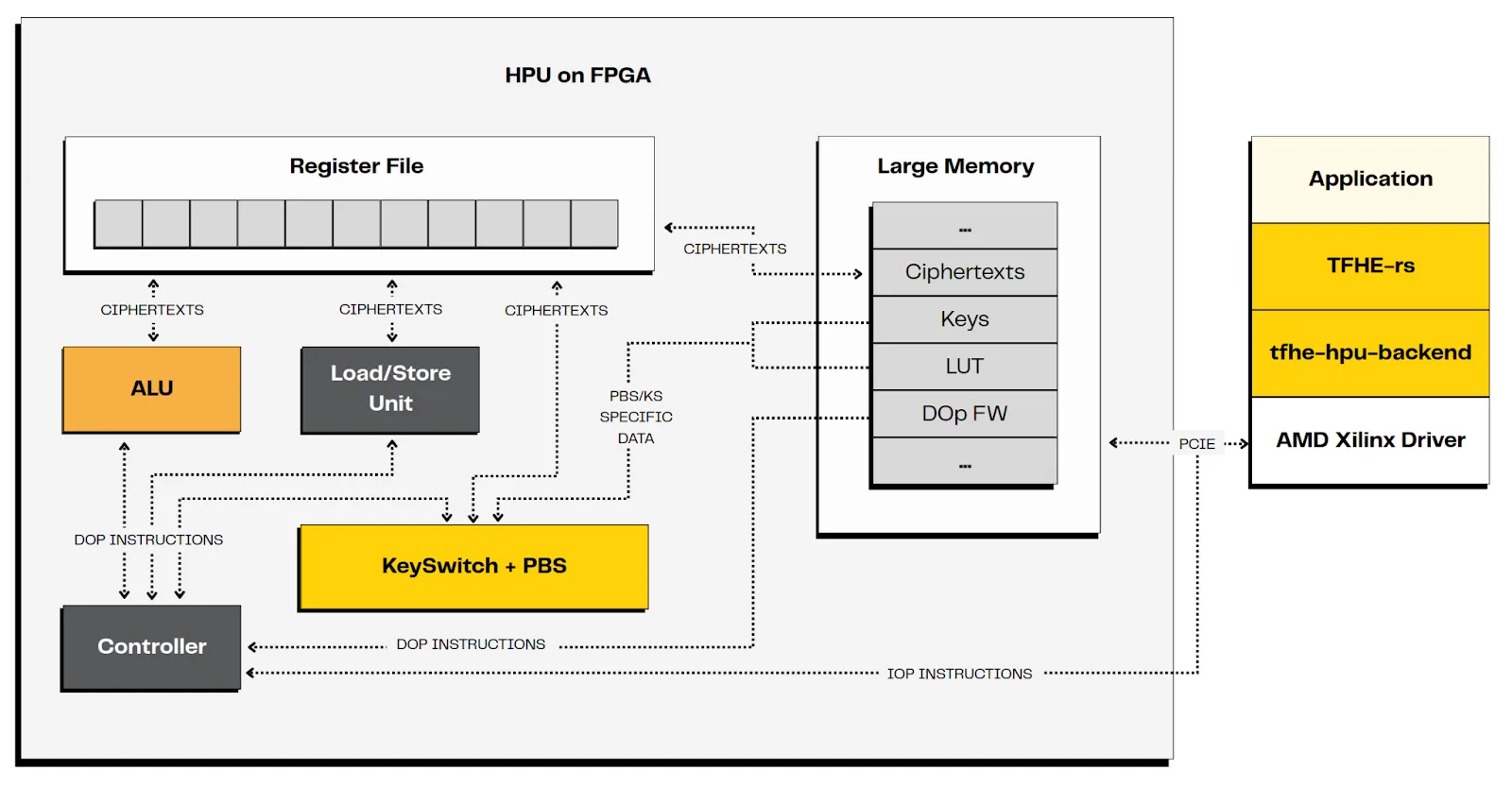
The first step to using the HPU is defining the IOp you want, and if necessary, providing its DOp implementation. Once that’s done, the HPU takes care of execution—noise management, LUT application, and parallel dispatch included.
Let’s walk through a concrete example step by step.
1. Writing the code
Suppose a user wants to compute the absolute difference between two encrypted values R=∣A−B∣ where A and B are two 2-bit ciphertexts encrypted with TFHE.
If this operation (IOp) is not already available in the catalogue, the user must define a custom IOp. Its signature is the following:
Here, this signature means. In details:
(Full IOp syntax: docs)
At the pseudocode level, the operation looks like this:
2. Translating into DOp code
Let’s write the associated DOp pseudocode. Keep in mind that the computation is performed homomorphically, meaning the actual values are unknown. Also remember that we only have 4-bit words available.
To compute x - y without overflow, we restrict the result to 3 bits using a pseudo two’s complement representation. In practice, we rewrite it as: x + (‘b100 - y).
Here, bit [2] is the opposite of the sign: (0) represents a negative value, and (1) represents a positive value.
Since the comparison is not an arithmetic operation, we need a LUT to implement this function which will be applied during the PBS. To do this, we first gather the 2 values to be compared into the same 4-bit word.
Then the PBS inputs are the LUT representing the comparison, and this word.
Selection is also non-arithmetic and therefore requires a LUT applied during another PBS.Ideally, selecting between two 2-bit values would need a 5-bit LUT input (1 bit for the selector and 2×2 bits for the data). But since only 4-bit words and 4-bit LUTs are available (the padding bit cannot be used), the selection must be split into two steps:
The translation into DOp code is straightforward:
Note: This custom IOp is shown as an example. A more efficient approach would be to use a single PBS with a LUT, since |A-B| with 2-bit inputs is just a 4-bit input → 2-bit output function.
See the DOp documentation for more details. Remember that a LUT can encode any 4-bit input → 4-bit output function, and you can define your own if it’s not already in the catalogue.
3. Execution on the HPU
Now let’s look at the execution of this code by the HPU.
1. HPU initialization
The host prepares the HPU for the computation.
Note that in practice, the whole DOp catalogue is loaded. Thus the associated IOp are ready for usage.
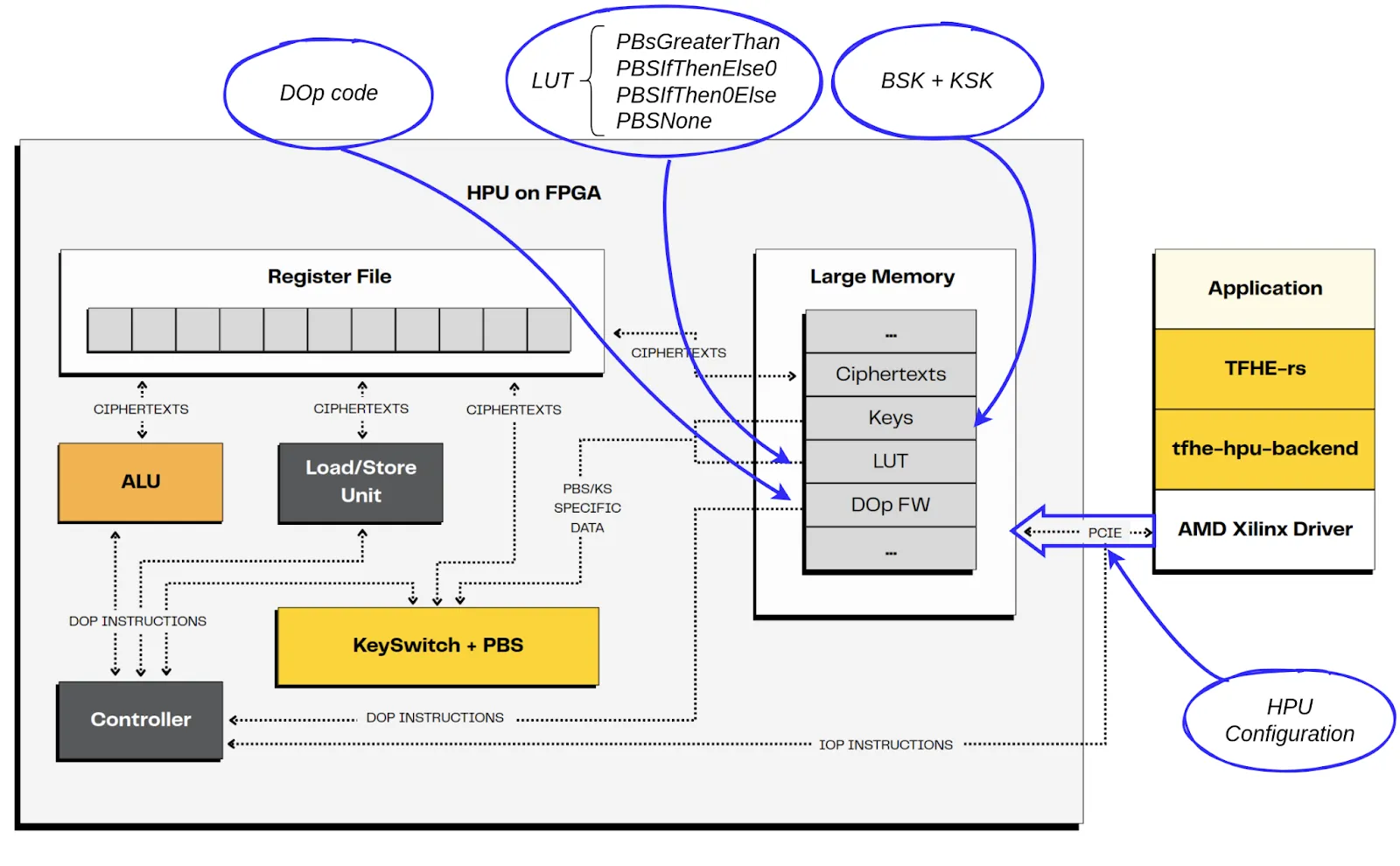
2. Process
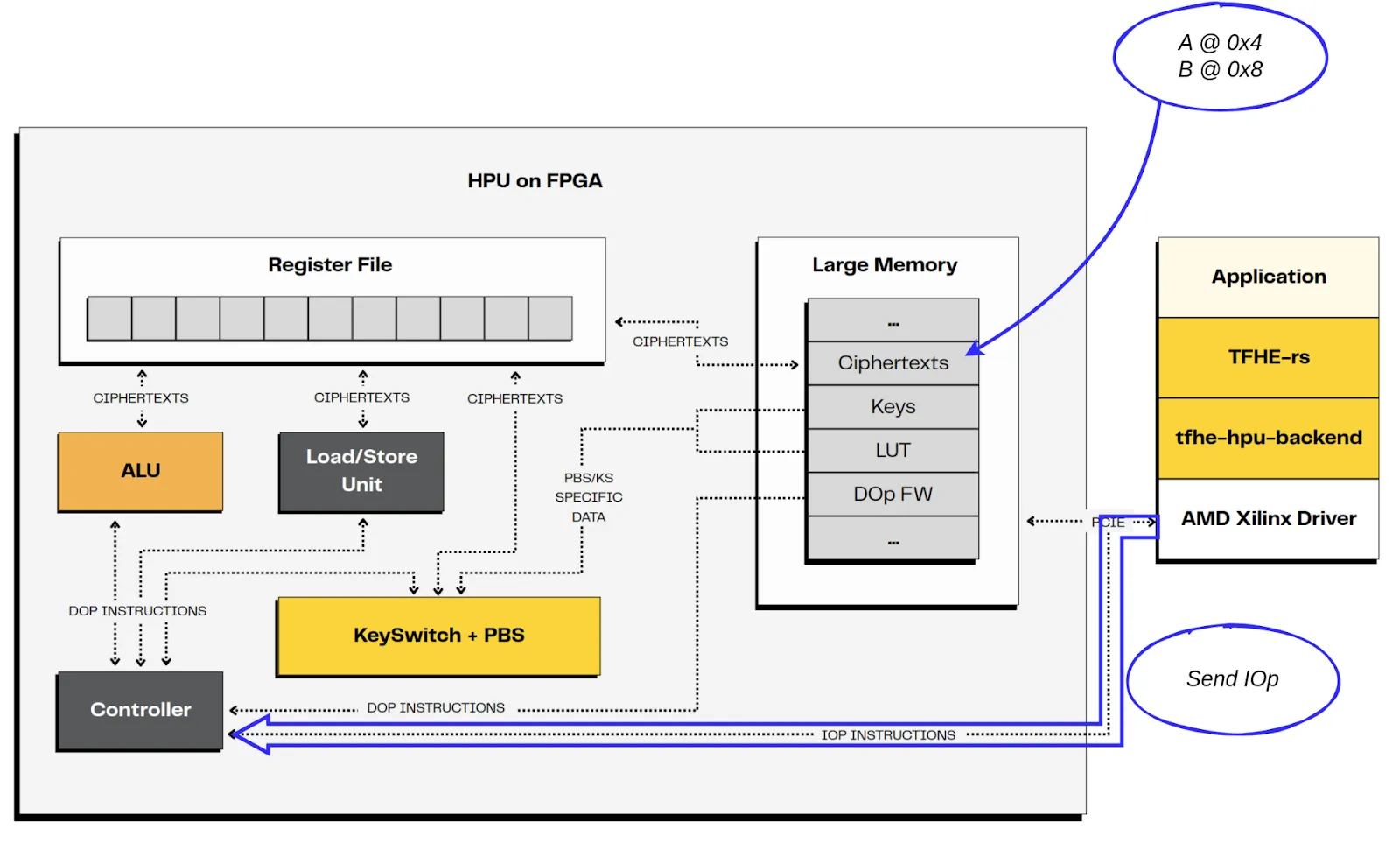
3. Execution
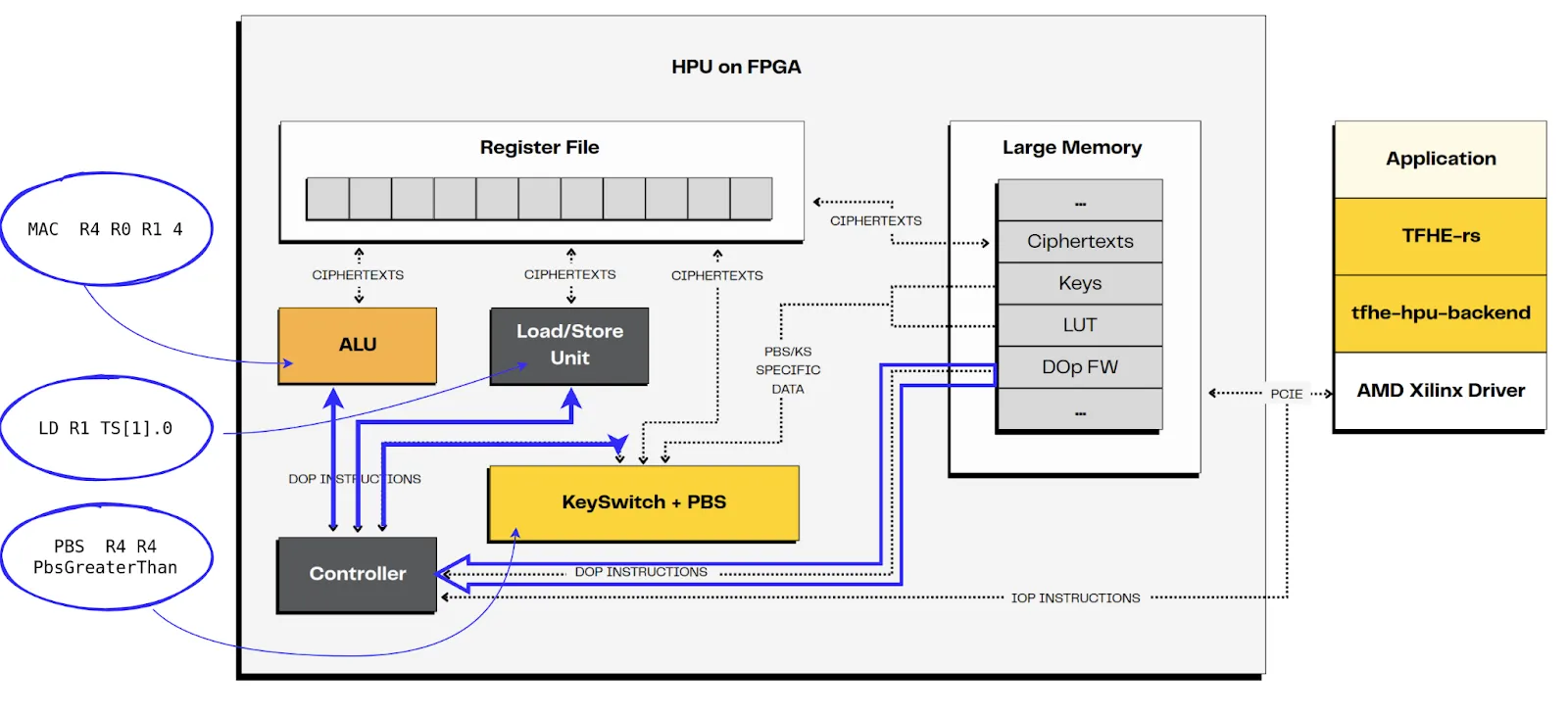
4. The controller informs the host of the end of the IOp program.
5. The host retrieves the result in HPU data memory, here in offset 0x0.
As you have noticed, the first step to use the HPU is to define the IOp code to be executed, and eventually the associated DOp code, if the operation is not already available.
The HPU bridges cutting-edge cryptography and hardware acceleration. By combining programmable operations (IOp/DOp), noise management (PBS/KS), and parallel execution, it enables developers to perform complex encrypted computations efficiently.
Whether you’re a researcher, a developer, or simply curious, you can start experimenting today with the available tools and tfhe-rs backend. No FPGA? Try the mockup to emulate HPU behavior.
All that’s left is to write some code!
News, research and product releases
Protocol

Solutions
PRODUCTS
Resources
community
company

.svg)
.svg)


.jpg)
.jpg)